
Day 2 of 90DaysOfDevOps

S
Sunney Sood is a Program Manager with experience delivering complex programs in Banking and Insurance. His interests span Program Leadership, Governance, Artificial Intelligence, Data Science, Cloud Technologies, and Digital Transformation. Through hands-on experimentation, industry research, and practical experience, he shares insights that help bridge strategy, technology, and business outcomes.
Skills
Program Management • Leadership • Governance • Stakeholder Management • Risk Management • Business Transformation • Artificial Intelligence • Data Science • Cloud Technologies • Agile Delivery
Today's task is to perform the following steps:
- Check your present working directory.
Used Command pwd to check present working directory:

List all the files or directories including hidden files.
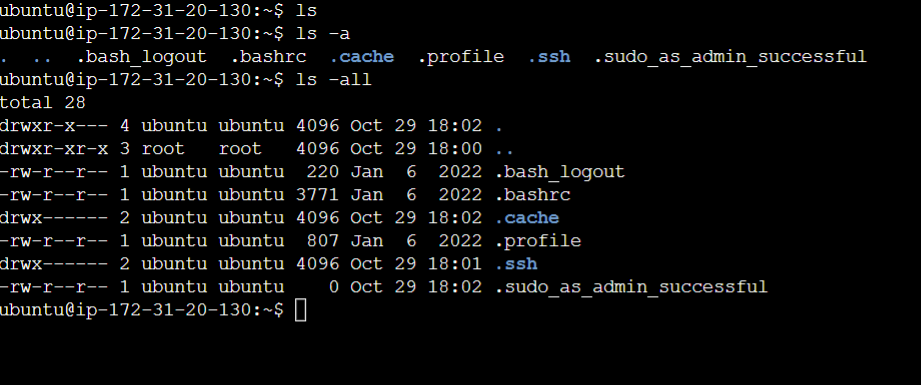
Using -a lists the hidden files while using -all lists all files with permissions and user account details
Create a nested directory A/B/C/D/E
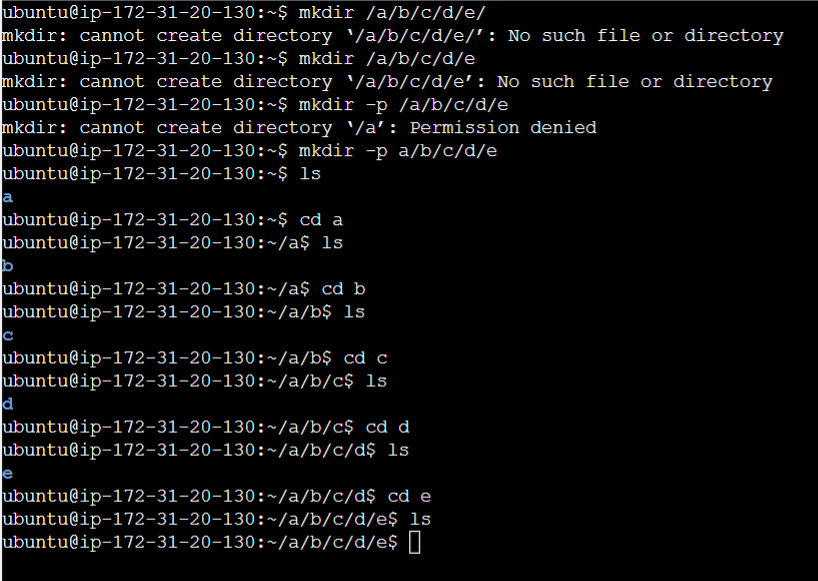
As you can see, I was unable to create the directory using :

This is because /a would have created the directory in root folder and I am not logged in as root. Though same can be accomplished using "sudo" appended at the start of mkdir command.